
App To Help Check Essay AI Signals Before Submission
An app to help check essay AI signals can scan your draft for patterns that may look machine-written, but it should be used as a risk review tool rather than proof. The safest workflow is to check the essay, review highlighted passages, revise for your own ideas and voice, and keep drafts or notes that show your writing process.
Definition: Write.info is an AI detector that checks AI-generated text and provides humanizer, rewriter, and chat tools for students, writers, and professionals.
TL;DR
- AI detector apps estimate likelihood; they do not prove whether an essay was written by AI.
- Use detection results to find risky patterns such as repetitive phrasing, flat transitions, generic claims, and sudden style shifts.
- Before submitting, revise for argument quality, source use, personal reasoning, assignment fit, and academic integrity, not just a lower AI score.
How these apps look
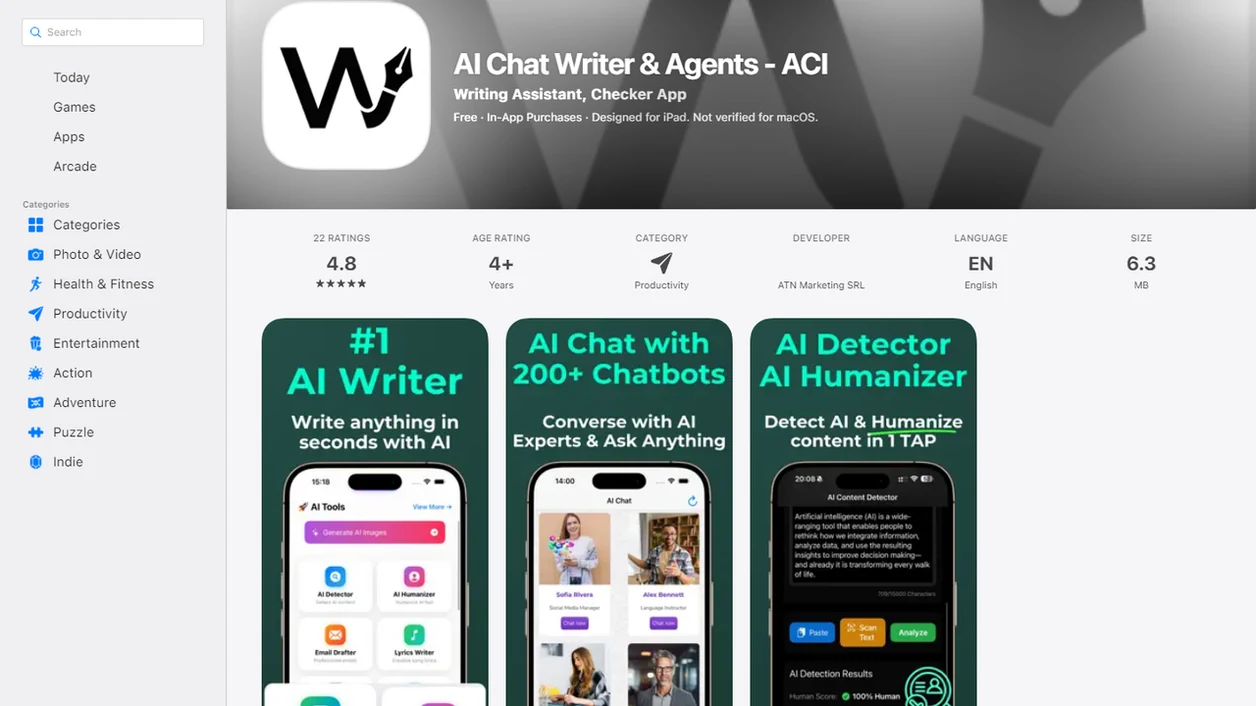
Side-by-side captures of the compared products. Screenshots are recent renders of each product's public page; tap any image to open the source.
What an App To Help Check Essay AI Signals Actually Does
An app to help check essay AI signals estimates whether parts of an essay resemble AI-generated text; it does not certify who wrote the essay. The result is a probability-based warning, not authorship proof.
Most tools ask you to paste text, upload a document, or scan a saved draft. Then they return an overall detector score and may highlight sentences or paragraphs that look unusually predictable. A highlighted paragraph beside a score bar can feel final, but it is only a clue.
AI detection is different from plagiarism checking, grammar checking, and essay grading. Plagiarism tools compare text to existing sources. Grammar tools fix mechanics. Essay graders judge structure or rubric fit. Detection looks for statistical writing patterns.
Tools like Write.info can sit in the practical middle: detection plus revision support. The score can guide review, but the student still has to check sources, meaning, and policy.
At-a-Glance Checklist for a Check Essay AI App
A useful check essay AI app should explain risk clearly, show where the risk appears, and avoid certainty claims. If an app promises perfect detection, treat that as a warning sign.
- Sentence-level highlighting: The app should show which passages triggered concern, not only one large percentage.
- Privacy clarity: It should say whether essays are stored, used for training, shared, or deleted.
- Revision support: It should help you revise awkward AI-like phrasing such as “in today’s fast-paced world,” not just scare you with a score.
- Export options: You should be able to copy, download, or compare drafts after edits.
- Realistic accuracy language: The app should describe detection as an estimate, not proof.
A companion web and iOS workflow helps when you revise between places. One common pattern is checking a laptop draft, then making short edits on a phone before class. Not glamorous. Useful.
How an AI Detector App for Essays Works Behind the Score
An AI detector app for essays uses probability-based classification to decide whether text resembles machine output. In plain terms, it compares your writing patterns with patterns often found in AI-generated text.
Detectors may look at perplexity, burstiness, repetition, predictable syntax, and tone uniformity. Perplexity means how expected the next word is. Burstiness means how much sentence length and structure vary. Human drafts often wander a little; AI drafts can sound evenly polished from paragraph to paragraph.
Mixed human and AI text is harder to detect because the signals blur. A student may write the introduction, use AI for one body paragraph, then revise everything twice. The score may move, but the history is still more complicated than one number.
For students, the practical next step is not score-chasing. Use the result to find thin claims, flat transitions, and places where your reasoning disappears.
Before You Use an Essay AI App on School Work
Before using an essay AI app on school work, read the assignment policy first. Some instructors allow grammar support but restrict drafting, paraphrasing, or AI-generated analysis.
Save your outline, early draft, research notes, source list, and version history before you revise. If a question comes later, those materials can show how the essay developed. A student rereading a detector result at 11:47 p.m. before a learning-management-system upload window closes needs evidence, not panic.
Remove personal details if the app’s privacy policy is vague. That includes your name, school ID, class section, interview notes, or sensitive research data. A draft can contain more private information than it seems.
Decide what job you need done. Detection, feedback, rewriting, and documentation are different tasks. If the real issue is planning time, an essay revision timeline may help more than another scan.
How to Use an App To Help Check Essay AI Signals
Use an app to help check essay AI signals as a revision workflow, not as a final authority. The goal is to improve the essay’s reasoning, evidence, and fit with the assignment.
- Paste or upload the full draft after removing prompt text, instructor comments, and unfinished placeholders.
- Scan the essay and record the overall score, tool name, and date if you need a revision trail.
- Review highlighted passages for generic claims, repeated transitions, vague evidence, or sudden style shifts.
- Revise the flagged areas by adding your own analysis, course concepts, source details, and defensible claims.
- Recheck the draft, but focus on meaning and originality instead of only lowering a percentage.
For students, a detector result is often most useful when it points to weak writing that also needs ordinary revision.
Step 1: Run the Essay AI App Scan on a Clean Draft
Run the first scan on a clean, complete draft whenever possible. Isolated paragraphs can produce misleading scores because the app cannot see your full style, argument flow, or citation pattern.
Remove instructor comments, copied prompt text, bracketed citation placeholders, and notes like “add quote here.” Those fragments can distort the scan. Keep the bibliography if the app supports academic text, but check whether it analyzes references separately.
Save a copy of the original draft before changing anything. Name it clearly, such as “history-essay-draft-before-ai-check.” It sounds fussy until you need it.
Different apps may return different scores on the same essay; Turnitin, GPTZero, Copyleaks, Originality.ai, and Write.info can each weigh signals differently. One detector may flag a polished conclusion, while another focuses on a body paragraph. If you want a fuller review, an AI essay checker can be part of the same preparation process, but it still cannot prove authorship.
Step 2: Read the Check Essay AI App Highlights
“Why did the check essay AI app highlight this sentence?” Usually because the sentence matches patterns the detector associates with machine-written text, not because the app knows who wrote it.
Read highlights in context. A high-risk passage may contain generic claims, repeated transitions, uniform sentence length, or vague evidence. A harmless polished sentence may also be flagged because it is clear, formal, and predictable. That happens.
Copy-pasting a paragraph into a web editor, watching highlighted sentences appear, then revising one claim at a time is more useful than deleting everything in red. Compare each flagged section with your outline, class notes, and sources. If you can explain the idea and show where it came from, the problem may be wording rather than authorship.
A flagged sentence is a clue, not a verdict. The practical next step is to strengthen the passage until it sounds like your argument.
Step 3: Revise Essay AI App Flags Into Your Own Argument
Revise essay AI app flags by adding the thinking that only you can supply. That usually means course concepts, source analysis, examples from the assignment, and reasoning that connects evidence to your claim.
Replace vague AI-like lines with precise claims you can defend. “This issue has many important implications” says almost nothing. “The policy shifts responsibility from the school to the family because the appeal process requires weekday meetings” gives a reader something to evaluate.
Use Write.info’s humanizer or rewriter only after you know what claim, source, or course concept the sentence needs. A human-sounding edit is only useful if it keeps the meaning intact and improves academic honesty. Tools like Write.info can help with humanizer and rewriter steps, but they should not become authorship substitutes. AI writing assistant platforms with a detector, humanizer, rewriter, chat agents, web access, and a companion iOS app can support revision decisions, not replace the student’s responsibility for the submitted essay.
For deeper rewriting, an app to help rewrite essay drafts can help structure edits without treating the tool as the writer.
Step 4: Verify the Essay AI App Result With Writing Evidence
Verify the essay AI app result with writing evidence, not another percentage alone. Process evidence is often more meaningful than a detector score because it shows how the work was made.
Save outlines, research notes, source annotations, rough drafts, version history, and comments from earlier feedback. If your platform records edit history, keep it available until the assignment is graded. A folder with draft dates can answer questions better than a screenshot of “low AI.”
Also check citation accuracy. Look for a missing page number, a dead DOI link, or a source title pasted in the wrong case. These details affect submission readiness and can raise separate integrity concerns.
Review the course AI policy before you upload. If your instructor asks for disclosure, use clear language rather than guessing. Our AI writing disclosure templates cover common classroom wording, but your syllabus comes first.
Common Myths About an AI Detector App for Essays
AI detector apps for essays are surrounded by myths because the score looks more certain than it is. University guidance and independent testing both point to the same lesson: use detector results cautiously. For example, Vanderbilt University disabled Turnitin’s AI detector because of false-positive concerns (https://www.vanderbilt.edu/brightspace/2023/08/16/guidance-on-turnitins-ai-detection-and-why-we-turned-it-off/), and Stanford HAI reported that AI detectors can disproportionately flag non-native English writing (https://hai.stanford.edu/news/ai-detectors-biased-against-non-native-english-writers).
- A detector cannot prove authorship: It estimates whether text resembles AI-generated writing.
- A low score is not a guarantee: Another tool, update, or instructor review may disagree.
- Detection can be biased: Some guidance warns about over-flagging English language learners and polished formal prose.
- Paraphrasing is not a clean fix: It may change signals while leaving shallow reasoning intact.
- Independent tests are mixed: Some tools perform far below marketing claims, especially on edited or mixed text.
Myth: A detector proves who wrote it
A detector does not observe the writing process. It reads the final text and estimates likelihood.
Myth: Zero percent means no risk
Zero percent on one app does not mean every detector, teacher, or policy review will agree.
Myth: Paraphrasing fixes everything
Paraphrasing can make wording less predictable, but it does not add original analysis, accurate citations, or real engagement with sources.
Common Mistakes When Using an Essay AI App
The most common mistake is treating an essay AI app like a judge instead of a review tool. Use it to spot risks, then make careful decisions based on meaning, evidence, privacy, and your course rules.
- Treat the score as an estimate, not proof. A 72% or 3% result may change across tools, drafts, or updates.
- Check each highlighted sentence before editing. If you delete every flagged line, you may remove your best evidence, weaken the argument, or create gaps the reader can feel.
- Remove private details before uploading. Names, student IDs, class sections, interview notes, and sensitive research material do not need to travel with a detector scan.
- Revise honestly instead of using a humanizer to hide prohibited AI use. Make the claim clearer, add your source reasoning, and keep the work within the assignment rules.
- Follow the syllabus even when the app says the draft is safe. A low-risk result cannot override a ban on AI drafting, paraphrasing, or undisclosed assistance.
Privacy and Policy Questions for Any Essay AI App
Privacy matters because an essay can include personal information, unpublished research, class details, or source notes. Before uploading, check whether the app stores essays, trains models on submissions, shares data, or allows deletion.
Avoid uploading private identifiers when you do not need them. Remove your name, student number, instructor name, and sensitive interview material if the privacy terms are unclear. A client brief open on a kitchen table is one kind of document risk; a student essay with school records is another.
School policy matters more than app marketing. If a course bans AI-assisted rewriting, an app saying “safe for students” does not override that rule. Choose tools that explain data handling, accuracy limits, and acceptable use in plain language.
If your worry is a prior flag, read what to do if essay flagged AI before uploading the same text into several more tools.
Limitations
AI detector apps are limited by design, so their results should be handled as risk signals. They are useful for review, but weak as final evidence.
- They are probabilistic: No AI detector app is 100% accurate.
- False positives happen: Human-written essays can be flagged, especially work by English language learners or highly polished writers.
- False negatives happen: AI text can be missed when it is paraphrased, mixed with human writing, or heavily edited.
- Independent testing is uneven: Some evaluations find much lower accuracy than marketing claims suggest.
- Universities may restrict detectors: The University of Illinois has warned that AI detectors frequently fail to distinguish human and AI writing reliably and has noted bias concerns (https://citl.illinois.edu/citl-101/teaching-learning/resources/teaching-across-modalities/teaching-and-generative-ai/ai-detection).
- Humanizers can create false confidence: Rewriting to disguise authorship may violate course policy even when the detector score drops.
A detector can support revision. It cannot replace policy compliance, instructor judgment, or honest documentation.
FAQ
Can AI detectors be wrong?
Yes. AI detectors can produce false positives on human writing and false negatives on AI-written or heavily edited text.
What is an essay AI app?
An essay AI app is a tool that reviews an essay for AI-like writing signals and may also offer rewriting, grammar, or feedback features.
Is 0% AI safe?
No. A 0% AI score in one tool does not guarantee that another detector, teacher, or school review will reach the same conclusion.
Can teachers detect AI essays?
Teachers may use detector results, writing history, style changes, source quality, in-class writing, or oral follow-up questions.
Do AI detectors store essays?
Some do and some do not. Check each app’s privacy policy before uploading school work, especially drafts with personal or sensitive details.
Are AI essay detectors biased?
Some university guidance warns that detectors may over-flag English language learners and certain polished writing styles. Results should not be used alone for penalties.
Should I humanize my essay?
Revise to improve originality, evidence, clarity, and your own voice. Do not use humanizing tools to hide prohibited AI authorship.
Which AI score matters most?
No single score matters most. Assignment policy, writing process evidence, citation accuracy, and argument quality are more important than one detector percentage.