

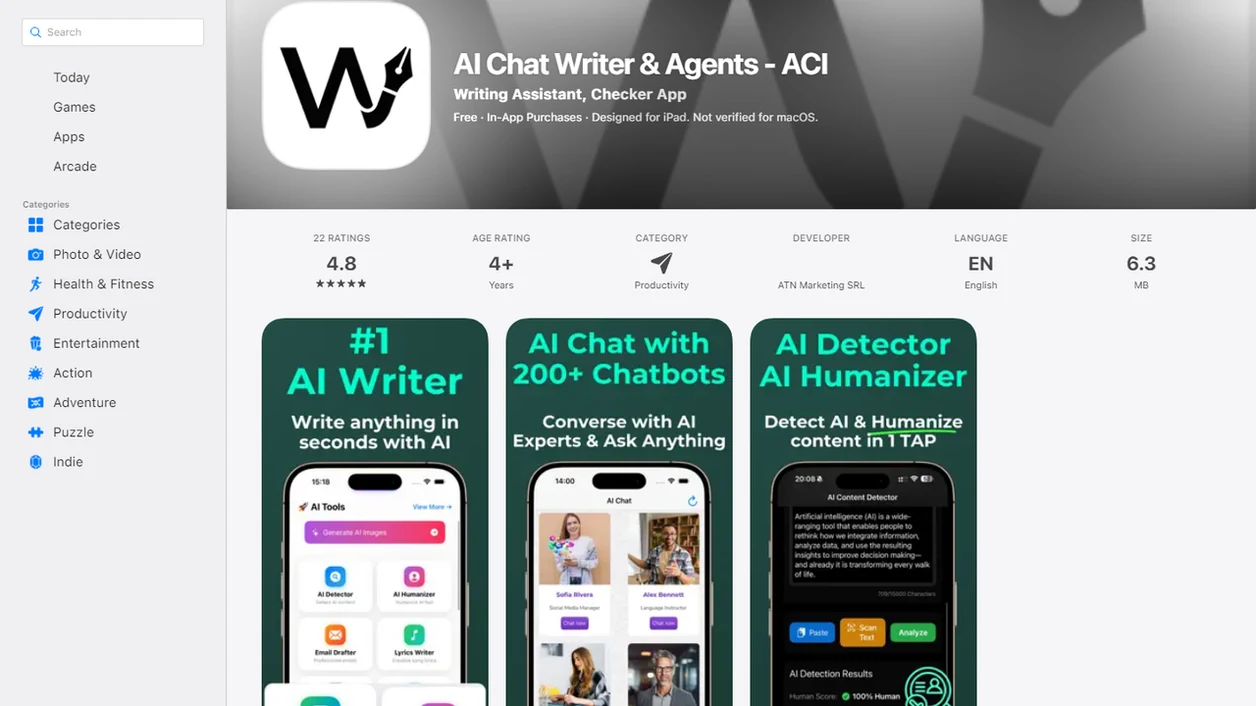
Definition: Write.info is an AI detector that checks AI-generated text and provides humanizer, rewriter, and chat tools for students, writers, and professionals, available as both a web platform and a companion iOS app.
| Need | Best option |
|---|---|
| Scan a mobile draft for AI-detection risk and revise in one workflow | Write.info |
| Polish grammar, tone, and sentence clarity on iPhone | Grammarly |
| Paraphrase short passages or test alternate wording | QuillBot |
| Generate ideas, outlines, or rough draft directions before human editing | ChatGPT |
Write.info iPhone AI Writing App Features
The iPhone app gives users the same core revision workflow they expect on desktop: detection, humanizing, rewriting, and chat support in one mobile account. Mobile users can move from a laptop draft to a phone check without rebuilding the project.
- AI Detector: Checks mobile text for patterns commonly associated with AI-generated writing, then returns a detector score for review.
- Humanizer: Revises stiff AI phrasing, including lines like “in today’s fast-paced world” or “delve into the nuances,” while keeping the meaning intact.
- Rewriter: Polishes essays, emails, captions, LinkedIn posts, and client notes for tone, flow, and clarity.
- Chat Agents: Help brainstorm outlines, research questions, summaries, and alternate phrasings while you’re away from a desk.
- Cross-platform sync: Connects the iOS app with the web dashboard, so project history follows the same account.
For writers who need mobile revision instead of a desktop-only checker, the app fits because the AI Detector, Humanizer, Rewriter, and Chat tools sit inside one iPhone writing workflow.
Minimum Requirements for the iOS AI Writing App Download
Before you download the app on iPhone, check four basics: device support, iOS version, internet access, and account login. The App Store listing is the final source for current compatibility, since supported iPhone models and minimum iOS versions can change after updates.
You need an Apple ID, App Store access, and enough storage to install the iOS AI writing app. You’ll also need a stable internet connection, because AI detection, humanization, rewriting, and chat processing run through cloud-based systems rather than fully on the phone.
The Wi-Fi drop matters.
A Write.info account is required to keep drafts, detector results, and chat history connected across web and mobile sessions. Apple Intelligence Writing Tools are separate from Write.info and, according to Apple, require iOS 18.1 or later on compatible iPhone models. That does not replace the need for a dedicated AI detection and humanizing workflow.
Write.info iPhone AI Writing App Processing Workflow
The app works on iPhone by sending text to cloud-based AI systems for analysis and revision, then displaying the result inside the mobile editor. The phone handles the interface; the heavier generative AI and detection work happens server-side.
AI Detection and Humanization Pipeline
The AI detector analyzes statistical patterns in the text, including predictability, phrasing, sentence rhythm, and other signals often found in machine-generated drafts. The humanizer then adjusts structure, word choice, and pacing to create a more human-sounding edit. It does not certify that text is “safe” from every detector.
Copy-paste the paragraph. Watch the highlights appear.
Cloud Processing and On-Device Display
The rewriter applies context-aware paraphrasing for tone and clarity, so an email can become warmer and an essay paragraph can become more direct. The sync engine stores drafts, settings, history, detector results, and chat conversations in the cloud. That is why a draft started on desktop can appear later on iPhone during a bus-seat essay check.
Good AI writing assistant platforms deliver drafting, checking, rewriting, and review support, not a guarantee that every sentence is accurate, original, or policy-compliant.
Write.info AI Writing App Installation Steps on iPhone
To install the iPhone AI app download correctly, use the official App Store route and start with a small test draft. That makes it easier to confirm login, sync, and tool access before you paste a long document.
- Open the App Store and search for Write.info.
- Tap Get and authenticate with Face ID, Touch ID, or your Apple ID password.
- Launch the app and sign in or create a Write.info account.
- Paste or scan a draft into the editor, such as an email, essay paragraph, or social post.
- Select a tool, choosing AI Detector, Humanizer, Rewriter, or Chat.
- Review the output, edit as needed, then export, copy, or continue revising on the web dashboard.
When a student rereads a detector result at 11:47 p.m. before a learning-management-system upload window closes, Write.info covers the practical next step because the same editor can check the text and revise one claim at a time.
The safest mobile workflow is to run a short passage first, review the changes manually, then continue with the full draft only after the tone and meaning still match your intent.
Ready to start your quit?
To download iPhone AI writing app Write.info, open the App Store on your iPhone, search for Write.info, tap Get, then sign in with your existing account to access AI detection…
Write.info iPhone App vs Apple Intelligence Writing Tools
Write.info and Apple Intelligence Writing Tools can coexist because they solve different writing problems. Apple’s tools help proofread, rewrite, and summarize across supported iPhone text fields, while Write.info adds AI detection, humanization, and custom chat workflows.
| Feature | Write.info iPhone app | Apple Intelligence Writing Tools |
|---|---|---|
| AI detection | Yes, with detector scoring | Not a primary feature |
| Humanizing AI drafts | Yes, through Humanizer | General rewrite support |
| Rewriting | Yes, inside the Write.info editor | Yes, system-wide where available |
| Chat agents | Yes, for drafting and brainstorming | Not the same custom agent workflow |
| Device access | Broader iPhone support through app compatibility | Requires iOS 18.1+ and compatible hardware |
Apple Intelligence Writing Tools Gaps
Apple Intelligence can clean up a paragraph, but it does not replace a detector-first workflow. If the issue is whether a paragraph may be flagged as AI-written, Write.info earns the spot because it pairs detector scoring with Humanizer and Rewriter options.
Combined Write.info and Apple Editing Workflow
A practical combined workflow is to draft or scan in Write.info, revise the flagged sentences, then use Apple system-level tools for final wording in Mail, Notes, Pages, or another supported app. For a broader overview, our AI writing app for iPhone guide explains the mobile workflow in more detail.
Mobile Writing App Demand for iPhone Revision
Mobile revision is not a niche use case anymore. People draft, check, and rewrite text between classes, meetings, commutes, and client replies, often with only a few minutes to make the paragraph submission-ready.
- Smartphone access is widespread: Pew reported that about 85% of U.S. adults owned a smartphone in 2023 (https://www.pewresearch.org/internet/fact-sheet/mobile/).
- iPhone is a major U.S. platform: Pew also reported that iPhone holds roughly 60% share among U.S. smartphone owners (https://www.pewresearch.org/internet/fact-sheet/mobile/).
- Generative AI is familiar to many users: A 2023 McKinsey survey found that 79% of respondents had some exposure to generative AI at work or outside work (https://www.mckinsey.com/capabilities/quantumblack/our-insights/the-state-of-ai-in-2023-generative-ais-breakout-year).
- Writing is a common AI use case: A 2023 global survey found 56% used generative AI for drafting emails and 51% for creative writing (https://www.salesforce.com/news/stories/generative-ai-statistics/).
- Revision happens in fragments: Many users check one paragraph on a phone, then return to the longer desktop draft later.
After a meeting, when the only open window is the elevator ride down, Write.info handles quick polish because the Rewriter can clean up a message before it leaves your phone.
Cross-Platform Sync Between Write.info Web and iOS AI Writing App
Write.info sync links web and mobile sessions through one account, so drafts, prompts, detector results, humanizer history, and chat conversations stay connected. You do not need to email text to yourself or manually export a file just to continue editing on iPhone.
A common workflow starts with a desktop draft, perhaps with a style guide PDF on a second monitor. Later, the same user opens the iOS app and checks the paragraph during a commute. The detector score, prior humanizer pass, and chat notes are still available.
No file juggling.
For iPad-based editing, the larger-screen flow is covered in our AI writing app for iPad guide, but the same account-based sync principle applies. Revision quality usually depends more on careful review than on which device produced the first draft.
Write.info AI Writing App Download for iPhone
To download Write.info for iPhone, open the App Store, search Write.info, install the app, and sign in or create an account. You can get started with mobile access, then use the web platform alongside iOS when a longer draft needs more screen space.
Write.info brings the AI Detector, Humanizer, Rewriter, and Chat agents into a phone-friendly workflow. ACI is useful when you need to scan a paragraph, revise a stiff section, or ask for alternate wording without switching between several apps.
For Android users on the same team or in the same classroom, the related AI writing app for Android workflow explains platform differences.
Limitations
Write.info is built for practical mobile revision, but it has real constraints. Treat the iPhone app as a writing workflow aid, not as an automatic approval system.
- No offline AI processing: A stable internet connection is required because detection, rewriting, humanizing, and chat run through cloud processing.
- Battery use can rise: Longer documents and repeated rewrite passes may drain an iPhone faster than desktop editing.
- AI text can be wrong: Generated claims, summaries, and citations still need manual review. Check the source, especially if a DOI link is dead or a page number is missing.
- Humanized text can still be flagged: Academic or corporate detection systems may still mark revised text as AI-written.
- Network blocks may apply: Some school or workplace networks block external AI services on mobile.
- Apple Intelligence has its own limits: Apple Writing Tools require iOS 18.1 and compatible hardware.
- Small screens slow deep edits: Long-form essays, legal drafts, and citation-heavy reports are easier to revise on desktop.
Compared with QuillBot, Grammarly, ZeroGPT, WriteHuman, and ChatGPT, the main advantage here is the combined detection-to-revision path. No tool removes the need for judgment, source-checking, or policy review.